
Does your phone battery seem to run out much faster lately? Maybe you start the day with a full charge, but by afternoon you’re already looking for a charger.
A fast-draining battery can be frustrating, especially when you rely on your phone for work, communication, entertainment, and everyday tasks. The good news is that battery drain is often caused by common issues that can be fixed without buying a new phone.
Here, you’ll learn the reasons your phone battery drains quickly and simple ways to improve it.
1. Your Screen Brightness Is Too High
The phone display uses a large amount of battery power. If your screen brightness stays near maximum all day, your battery will drain much faster.
Many people increase brightness outdoors and then forget to lower it afterward. Over time, this can have a noticeable impact on battery life.
What to do:
• Lower your screen brightness when possible.
• Enable auto-brightness or adaptive brightness.
• Reduce screen timeout settings so the display turns off sooner when not in use.
Even a small reduction in brightness can help your battery last longer.
2. Having Too Many Background Apps Open
Even when closed, some apps continue to run in the background. They may check for updates, refresh content, track your location, or send notifications.
When several apps run in the background at the same time, they can quietly consume battery power throughout the day.
What to do:
• Check battery usage in your phone settings.
• Identify apps using unusually high battery power.
• Limit background activity for apps you don’t use often.
• Remove apps you no longer need.
Keeping background activity under control can make a significant difference.
3. Location Services Are Always On
GPS and location tracking are useful for navigation, weather updates, ride-sharing apps, and maps. But when location is always on, your battery tends to run down quickly.
Some apps continue requesting your location even when you’re not actively using them.
What to do:
• Turn off location services when not needed.
• Allow location access only while using an app.
• Review app permissions regularly.
This simple adjustment can help extend battery life without affecting daily use too much.
4. Too Many Notifications
Every notification wakes up part of your phone, uses processing power, and sometimes turns on the screen.
A few notifications aren’t a problem, but dozens or even hundreds throughout the day can contribute to battery drain.
What to do:
• Disable notifications from unnecessary apps.
• Keep alerts only for apps that matter.
• Review notification settings every few months.
Fewer notifications can also make your phone feel less distracting.
5. Poor Mobile Signal
Many people don’t realize that weak cellular coverage can drain a battery quickly.
When your phone struggles to maintain a connection, it uses extra power searching for a stronger signal. This often happens in remote areas, elevators, underground parking garages, or buildings with poor reception.
What to do:
• Connect to Wi-Fi when available.
• Turn on Airplane Mode when you’re in areas with no signal.
• Avoid constantly switching between mobile networks if coverage is unstable.
A stronger connection usually means better battery efficiency.
6. Battery-Hungry Apps
Some apps naturally use more power than others. Video streaming apps, mobile games, navigation apps, and social media platforms often consume large amounts of battery.
Apps that constantly load new content or play videos can quickly reduce battery life.
What to do:
• Check which apps use the most battery.
• Limit usage of power-hungry apps when necessary.
• Close apps that are actively using GPS, video, or heavy processing.
If one app suddenly starts using much more battery than normal, it may need an update or reinstall.
7. Your Phone Software Needs Updating
Installing updates often improves performance, fixes bugs, and optimizes battery use.
Old software may drain your battery faster, especially if the problems were fixed in updates.
What to do:
• Check for system updates regularly.
• Install updates when available.
• Restart your phone after updating.
Keeping software current helps your device run more efficiently.
8. Too Many Widgets and Live Features
Widgets can be convenient because they display information directly on your home screen. However, some widgets constantly refresh data such as weather updates, news feeds, stock prices, or sports scores.
Live wallpapers can also consume extra battery power.
What to do:
• Remove widgets you don’t use.
• Replace live wallpapers with static backgrounds.
• Keep your home screen simple.
Small changes like these can reduce unnecessary battery usage.
9. Bluetooth and Wi-Fi Staying On All the Time
Bluetooth and Wi-Fi are generally efficient, but they still use power when constantly searching for connections.
If you’re not using wireless devices or Wi-Fi networks, leaving these features active may contribute to battery drain.
What to do:
• Turn off Bluetooth when not in use.
• Disable Wi-Fi when you’re away from available networks.
• Disconnect accessories you no longer need.
Even though the effect is minor, every little change can help extend battery life.
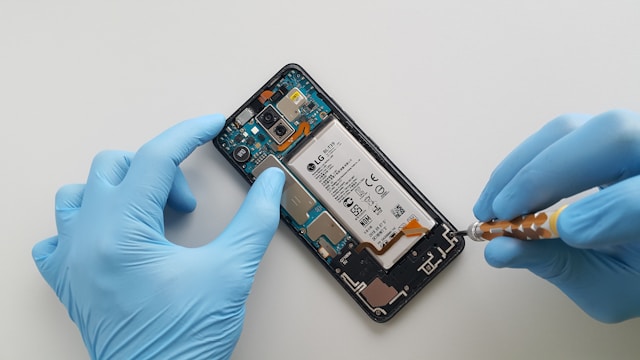
10. Your Battery Is Getting Older
Phone batteries don’t last forever. Most smartphone batteries gradually lose capacity after hundreds of charging cycles.
As batteries age, they hold less charge and may drain faster than they did when the phone was new.
Common signs of battery aging include:
• Needing multiple charges per day.
• Battery percentage dropping suddenly.
• Unexpected shutdowns.
• Noticeably shorter battery life.
What to do:
• Check your battery health if your phone offers this feature.
• Consider battery replacement if battery health is significantly reduced.
• Avoid replacing the entire phone if only the battery is worn out.
Sometimes, a new battery is all it takes to make an old phone dependable again.
11. Extreme Temperatures
Your battery doesn’t perform well in very hot or very cold conditions.
High temperaturesareespecially harmfulbecause they can permanently reducebatterycapacityover time. Cold weather may temporarily make yourbattery drain faster until the device warms up again.
What to do:
• Avoid leaving your phone in direct sunlight.
• Don’t leave it in a hot car.
• Keep it within normal operating temperatures whenever possible.
Protecting your phone from extreme temperatures helps preserve battery health.
12. Too Many Automatic Syncing Services
Your phone may constantly sync emails, cloud storage, photos, calendars, contacts, and other online services.
Frequent syncing can increase battery consumption, especially if multiple accounts are connected.
What to do:
• Reduce sync frequency where possible.
• Disable syncing for accounts you don’t use often.
• Upload photos manually if automatic backups aren’t necessary.
Managing sync settings can help reduce background activity.
13. Malware or Problematic Apps
Although less common, a malicious app or a poorly designed application can drain battery life rapidly.
If battery problems started immediately after installing a new app, that app may be responsible.
What to do:
• Uninstall recently added apps if problems began afterward.
• Download apps only from trusted sources.
• Run built-in security scans if available.
Removing problematic apps often restores normal battery performance.
14. Charging Habits Can Affect Battery Health
Modern smartphones are designed to handle daily charging, but certain habits can still affect long-term battery health.
Examples include:
• Frequently exposing the battery to excessive heat.
• Using low-quality chargers.
• Keeping the phone extremely hot while charging.
What to do:
• Use reliable charging accessories.
• Avoid covering your phone while charging.
• Keep the device cool during charging sessions.
Good charging habits help maintain battery health over time.
Simple Ways to Make Your Battery Last Longer
If you’re looking for quick improvements, try these practical tips:
• Lower screen brightness.
• Turn on battery saver mode.
• Disable unused wireless features.
• Limit background app activity.
• Reduce screen timeout duration.
• Keep software updated.
• Remove unnecessary widgets.
• Use Wi-Fi when available.
• Review battery usage regularly.
• Restart your phone occasionally.
These small adjustments can add up to noticeable battery savings.
Final Thoughts
If your phone battery is draining fast, there’s usually a reason behind it. High screen brightness, background apps, weak signals, location tracking, aging batteries, and outdated software are some of the most common causes.
The best approach is to check your battery usage settings and identify what’s consuming the most power. In many cases, a few simple changes can significantly improve battery life without spending any money.
Most battery problems are manageable, and with the right settings, your phone can stay powered longer throughout the day.



No comments yet.